
Pokemon Arena 2D Controls & Combat Mechanics: Blades, Specials & Walls
Master all controls and combat physics in Pokemon Arena 2D: Special launch timing, +35 HP Potion saves, 4x speed-up, closing walls, and 12s sudden death.
Frequently Asked Questions
What are the controls during an active battle in Pokemon Arena 2D?
How much damage do blades deal when they collide?
When do the arena walls start shrinking in Pokemon Arena 2D?
What happens in a Normal vs Ghost stalemate where neither blade can deal damage?
What Are the Controls in Pokemon Arena 2D (Browser & Editions)?
Because players arrive at Pokemon Arena 2D from both the browser HTML5 edition (embedded on our Play Online Homepage) and standalone community builds (such as Empress: Pokémon 2D Arena and the Big Kid Nation 2D brawl prototype), here is the complete control reference for both styles of play.
1. Live HTML5 Browser Edition Controls (Mouse & Mobile Touch)
In the official HTML5 browser build, all actions are controlled via Left-Click (Desktop) or Tap & Drag (Mobile/Tablet):
| Screen / Phase | Control Input | Exact In-Game Function |
|---|---|---|
| ** Arcade Cabinet Bar** | Theater / Fullscreen / Reload |
Expands the game viewport to widescreen or native fullscreen on Pokemon Arena 2D Online |
| Silhouette Trivia | Click / Tap 1 of 4 Names | First to identify the silhouette chooses 1st or 2nd pick in the 12-type draft |
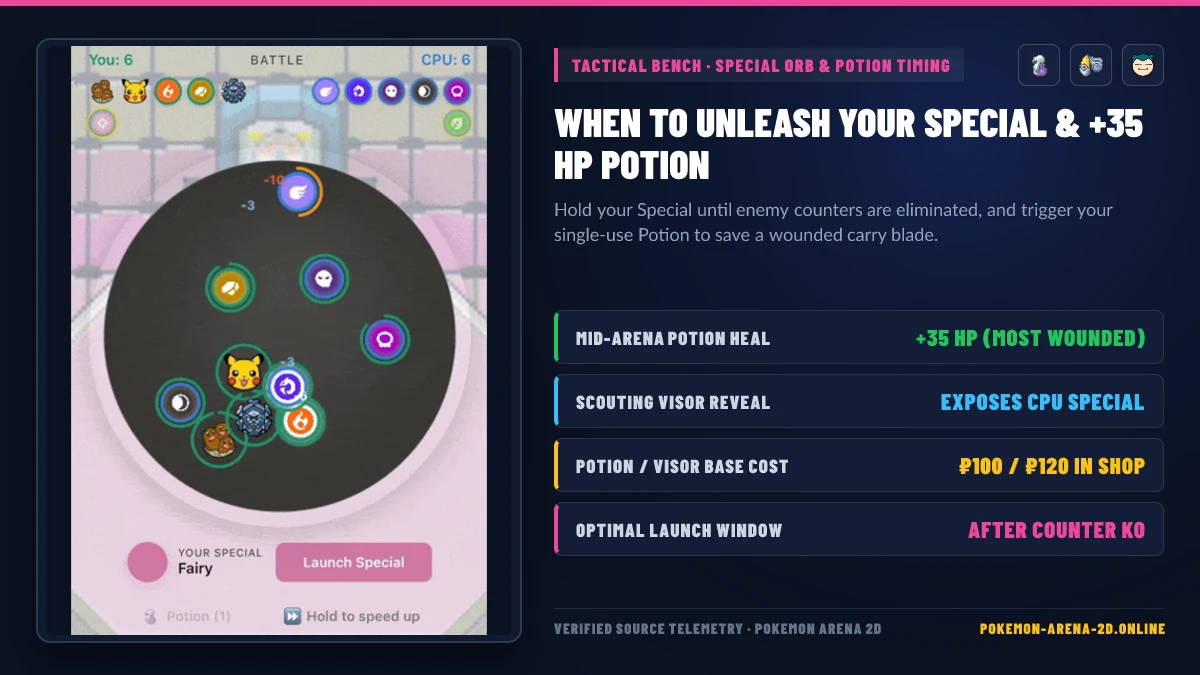
| 12-Type Draft & Special | Click / Tap Type Card | Drafts 6 types, then selects 1 type to hold back as your reserve Special (Scout button reveals CPU Special if owned) |
| Arena Bench: Launch Special | Click Launch Special |
Immediately deploys your 6th reserve blade into the arena at full HP (70–78 HP) |
| Arena Bench: Potion | Click Potion |
Restores +35 HP (POTION_HEAL = 35) to your most wounded active blade (1 use per match) |
| Arena Bench: Speed Up | Hold ⏩ Hold to speed up |
Accelerates simulation speed by 4.0× (ARENA_FAST = 4) while held in vs-CPU mode |
| Game Corner Match-3 | Drag Tile to Adjacent Tile | Swaps adjacent Pokémon icons on the 5×5 grid (3 Swaps per ₽15 spin) |
2. Standalone Direct-Control Fan Builds (Empress / Desktop Action Prototypes)
If you are playing one of the direct-control desktop builds covered in our Download & Versions Comparison Guide, keyboard bindings follow standard 2D arena fighter layouts:
- Movement:
WASDorArrow Keys(8-directional arena movement) - Basic / Elemental Attacks:
J/K/LorZ/X/C(Primary, Secondary, and Special cooldown moves) - Dash / Dodge:
SpacebarorLeft Shift
How Does Arena Blade Physics & Collision Damage Work?
Understanding the exact physics constants inside arena.js and data.js gives you a massive edge when drafting and timing your Special launch.
Asymmetric Simultaneous Collision Math
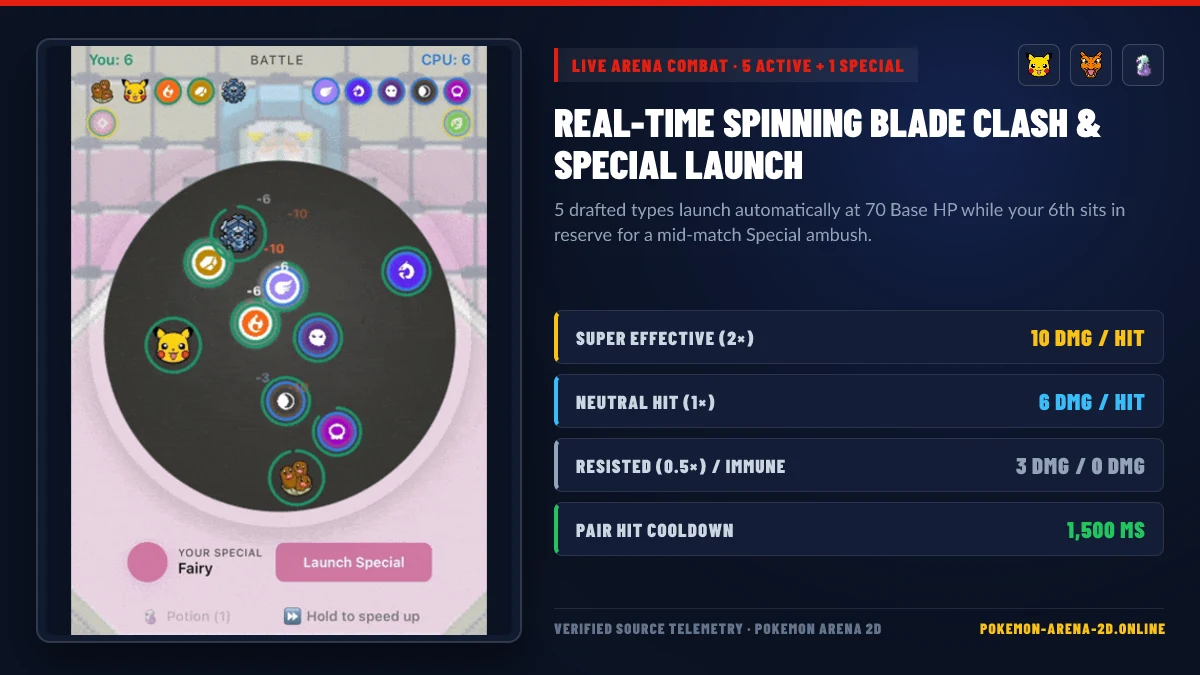
When Blade A and Blade B collide inside the circular stadium, both blades strike each other simultaneously using their respective offensive type multipliers (EFF[atk][def]):
| Attack Effectiveness | Multiplier | Damage Dealt per Collision | Visual Indicator |
|---|---|---|---|
| Super Effective | 2.0× |
10 Damage |
Red floating -10 + Super effective! callout |
| Neutral (Normal) | 1.0× |
6 Damage |
White floating -6 |
| Not Very Effective | 0.5× |
3 Damage |
Muted floating -3 |
| No Effect (Immune) | 0.0× |
0 Damage |
0 damage (badge-immune) |
Key Physics Engine Constants (arena.js)
- Base Blade HP (
BLADE_HP = 70): Unassigned blades start at70 HP. Equipping Pokémon in The PC adds+1to+8 HPvia the PC BST HP Bonus Formula. - Pair Hit Cooldown (
HIT_COOLDOWN = 1500ms): Once two specific blades damage each other, that exact pair cannot exchange damage again for1.5 secondsof match time, preventing instant multi-hit deletion when blades get wedged against a wall. - Hidden Type Speed Order (
TYPESArray): In the draft grid, types are ordered from fastest to slowest—Normal, Fire, Water, and Electric travel at higher base velocity tweaks, while Dragon, Dark, Steel, and Fairy move slightly slower like heavy bruisers. - Anti-Whirlpool Wall Bias (
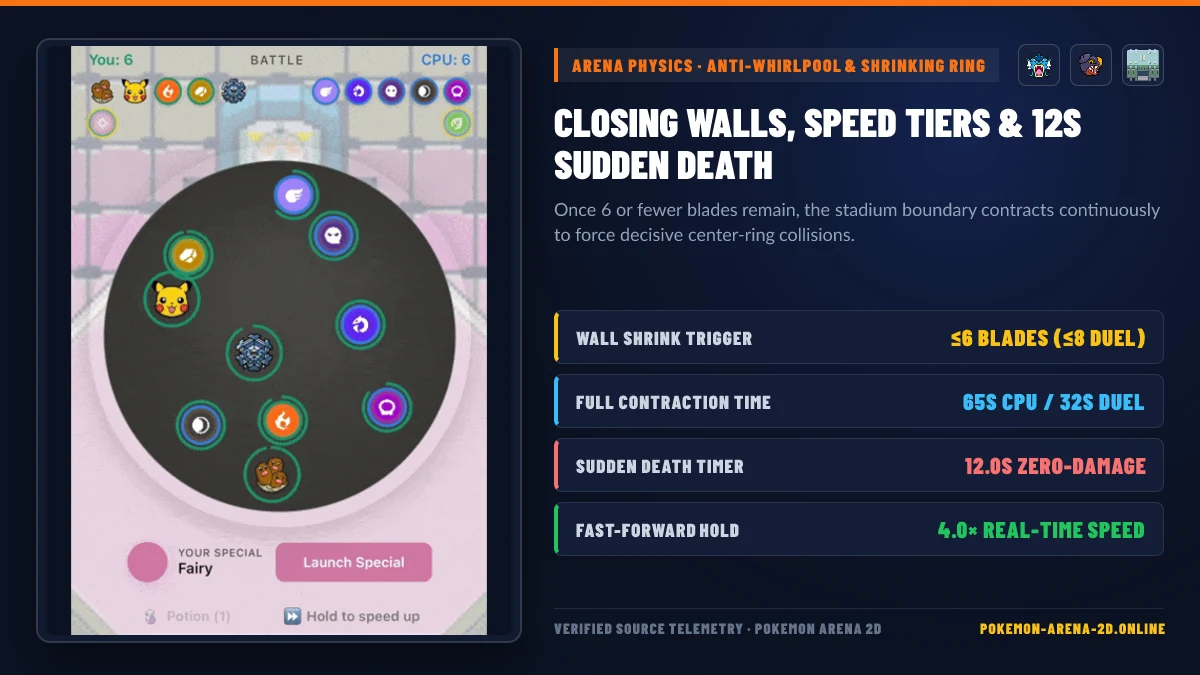
WALL_INWARD_BIAS = 0.35): To stop surviving blades from orbiting the outer circle forever without touching, every wall bounce steers the blade’s trajectory35%back toward the center of the stadium with±50%random jitter (WALL_BIAS_JITTER = 0.5).
When Should You Launch Your Special & Use Your Potion?
Most beginners click Launch Special in the first five seconds of the match. That wastes your biggest tactical advantage!
3 Rules for Frame-Perfect Special Timing
- Wait Until Your Special’s Counter Dies: If you held Fire or Dragon as your Special, keep it on the bench while the enemy’s Water, Rock, or Fairy blade is still spinning at high HP. Launching into a living counter lets the enemy chip your fresh blade down during the chaotic 10-blade opening brawl.
- Deploy Right as Closing Walls Activate (
≤ 6 Blades): In vs-CPU mode, the CPU automatically deploys its reserve Special once early KOs thin the ring. Waiting until6 or fewer bladesremain lets your Special enter at 100% HP (70–78 HP) against bruised opponents sitting at15–30 HP. - Save Your
+35 HPPotion for a Type-Advantaged Survivor: Your Potion automatically targets whichever of your currently active blades has the lowest HP (healing up to+35 HP, capped at max HP). Trigger it when a blade that holds a2×advantage over the CPU’s remaining roster drops below25 HP—healing it back to55+ HPguarantees it survives four more Super Effective collisions!
How Do Closing Walls & Sudden Death Resolve Endgame Fights?
To ensure matches never stall indefinitely, Pokemon Arena 2D enforces two deterministic endgame mechanics:
- Continuous Closing Walls (
SHRINK_START_ALIVE = 6): Once total living blades drop to6in vs-CPU (or8in Multiplayer PvP Duels), the white stadium boundary shrinks continuously over 65 seconds (32 secondsin Duels) down to1.6×blade radius (SHRINK_FLOOR_BLADES = 1.6), physically forcing the final blades into center-ring contact. - 12-Second Sudden Death (
STALEMATE_MS = 12000): If two mutually immune blades (such as Normal vs Ghost) or two passive orbiters go 12.0 seconds without any damage landing, a 4-second warning flashes at8.0sand the referee awards the match to the side with higher remaining HP.
Related Articles
arenas
Pokemon Arena 2D Multiplayer & Duel Mode: Play vs Friends Online
How to play Pokemon Arena 2D online multiplayer vs friends: 4-letter Room Codes, deterministic lockstep physics, Duel HP bonuses, and Empress 2D Arena PvP.
arenas
Pokemon Arena 2D Safari Zone, Game Corner & Shop Economy Guide
Complete economy guide for Pokemon Arena 2D: Safari Zone catch weights and anti-dupe pity, Game Corner 5x5 Cascade Slots payouts, and Shop surcharge math.
codes
Pokemon Arena 2D Codes, Cloud Save Restore & Free ₽ Rewards (2026)
Verified guide to Pokemon Arena 2D codes (2026): how the 16-character Cloud Save Restore Code works, 4-letter PvP Room Codes, and all free ₽ farming methods.
Was this helpful?
Thanks for the feedback!